> For the complete documentation index, see [llms.txt](https://documentation.soulver.app/llms.txt). Markdown versions of documentation pages are available by appending `.md` to page URLs; this page is available as [Markdown](https://documentation.soulver.app/zh/documentation/line-references.md).
# 行引用
使用前一个答案进行计算(类似于电子表格)
Soulver 允许您在计算中使用对先前行答案的引用,就像电子表格一样。
您可以返回并编辑前一行,所有引用了该行的行都会自动重新计算。
#### 要引用前一行:
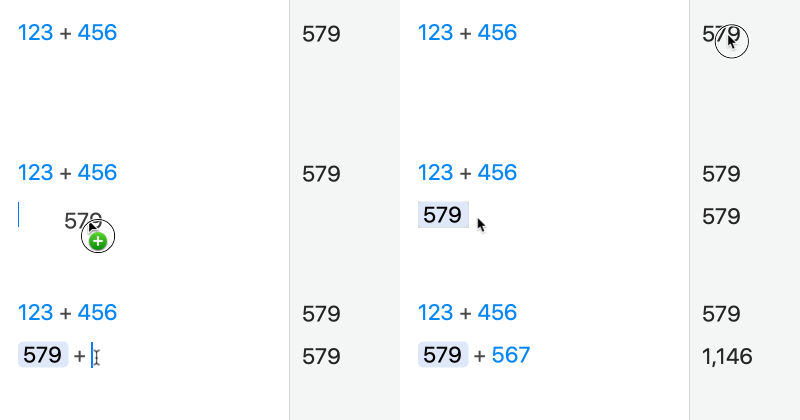
1. 将您想要引用的行的答案拖入:
{% hint style="info" %}
您也可以双击答案来插入对它的引用
{% endhint %}
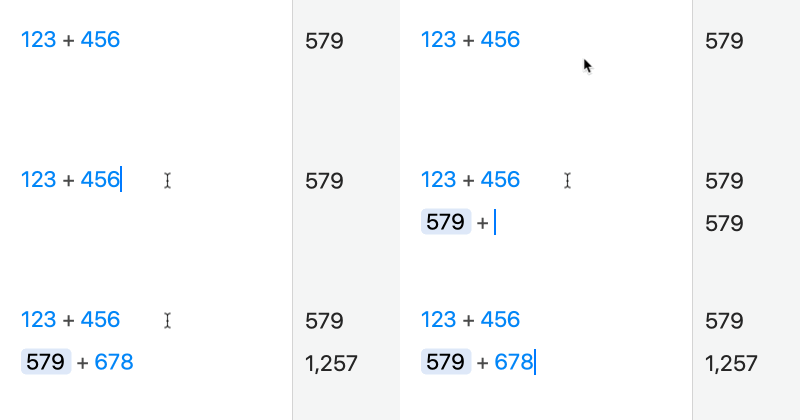
2. 在输入回车后立即输入一个运算符(如 +)以开始新行:
您也可以使用按键 ⌘\ 来插入对前行的引用。
{% hint style="warning" %}
注意:您只能引用当前行**上方**的行。
{% endhint %}
{% hint style="info" %}
如果您想禁用一个引用,但保留表达式当前的状态,可以右键单击该引用并选择“解除链接”(Unlink)。
{% endhint %}