> For the complete documentation index, see [llms.txt](https://documentation.soulver.app/llms.txt). Markdown versions of documentation pages are available by appending `.md` to page URLs; this page is available as [Markdown](https://documentation.soulver.app/zh/documentation/formatting/appearance-and-styles.md).
# 文本样式
### 语法高亮
语法高亮可帮助你了解 Soulver 如何解析表达式。数字、变量和运算符以不同颜色显示,Soulver 能识别的短语带有下划线。
### 行高亮
可以分别高亮一行的正文、标签或注释。高亮会替换该部分的语法颜色。
**在 Mac 上:** 将光标置于要突出显示的正文、标签或注释中,然后从 **Format > Highlight** 中选择颜色。您还可以按住 Control 键单击线条的该部分,然后从上下文菜单中选择突出显示颜色。
**在 iPad 和 iPhone 上:** 在正文、标签或注释中选择文本,然后从编辑菜单中选择 **Highlight** 并选择颜色。
### 自定义高亮颜色
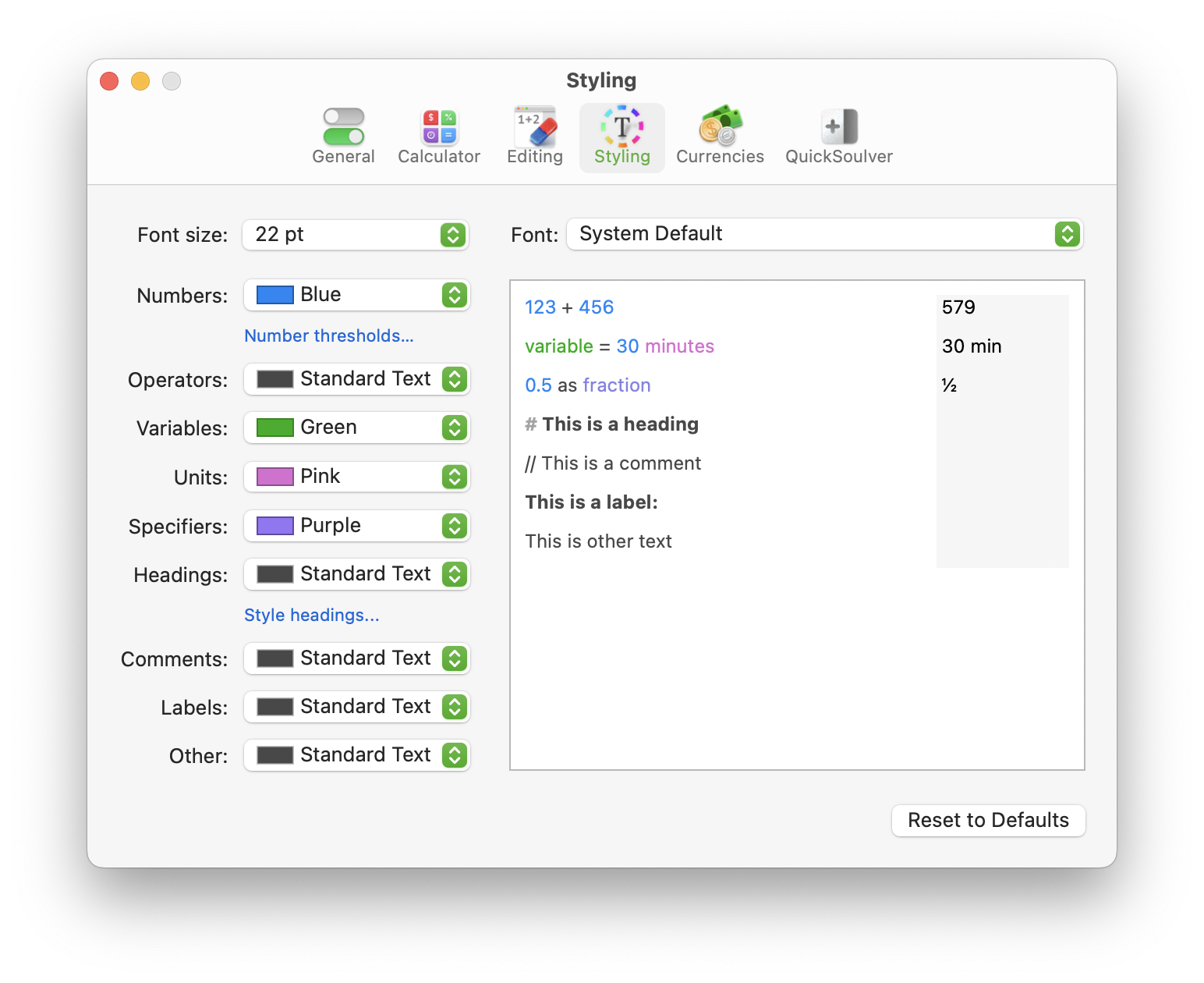
在 **样式 (Styling)** 设置面板中,自定义 Soulver 用于指示您表达式各个部分的颜色:
.png?alt=media)
.png?alt=media)