> For the complete documentation index, see [llms.txt](https://documentation.soulver.app/llms.txt). Markdown versions of documentation pages are available by appending `.md` to page URLs; this page is available as [Markdown](https://documentation.soulver.app/ru/documentation/line-references.md).
# Ссылки на строки
Вычисления с использованием предыдущих ответов (как в таблице)
Soulver позволяет ссылаться на ответы предыдущих строк в вычислениях, как в таблице.
Вы можете вернуться и отредактировать предыдущую строку, а все строки, которые на неё ссылаются, будут автоматически пересчитаны.
#### Как сослаться на предыдущую строку:
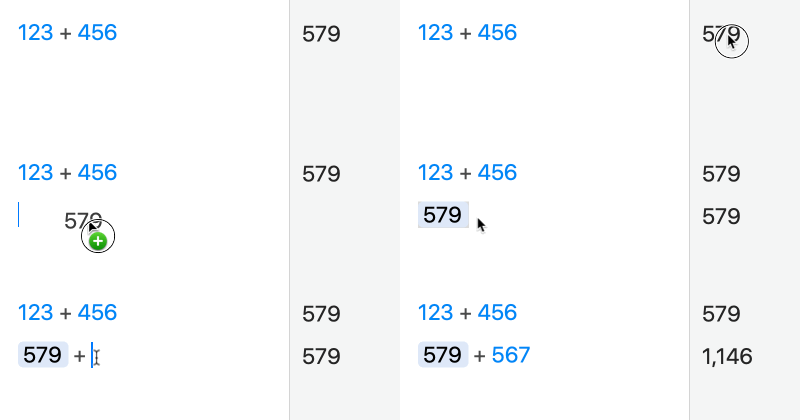
1\. Перетащите ответ из строки, на которую хотите сослаться:
{% hint style="info" %}
Вы также можете просто дважды щёлкнуть по ответу, чтобы вставить на него ссылку
{% endhint %}
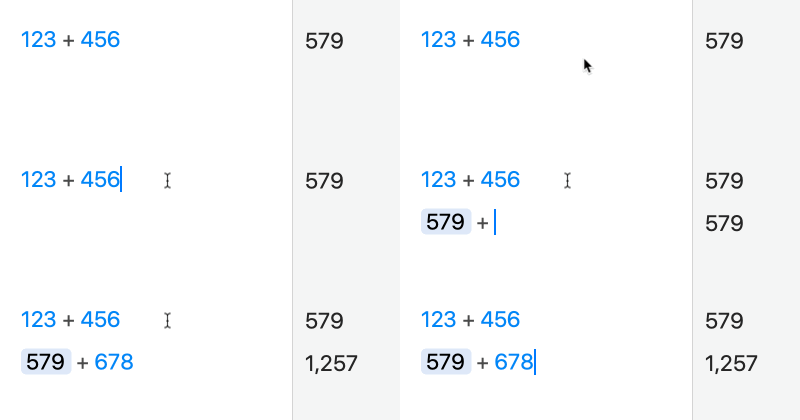
2\. Введите оператор (например +) сразу после нажатия return, чтобы начать новую строку:
Вы также можете вставить ссылку на предыдущую строку с помощью сочетания клавиш ⌘\\.
{% hint style="warning" %}
Примечание: можно ссылаться только на строку **выше** текущей.
{% endhint %}
{% hint style="info" %}
Если вы хотите отключить ссылку, но оставить выражение в текущем состоянии, щёлкните ссылку правой кнопкой мыши и выберите 'Unlink'.
{% endhint %}