> For the complete documentation index, see [llms.txt](https://documentation.soulver.app/llms.txt). Markdown versions of documentation pages are available by appending `.md` to page URLs; this page is available as [Markdown](https://documentation.soulver.app/ko/documentation/line-references.md).
# 행 참조
이전 답변을 사용하여 계산 수행하기 (스프레드시트와 유사)
Soulver를 사용하면 스프레드시트처럼 이전 라인의 답변을 계산에 참조할 수 있습니다.
이전 라인을 편집하고 나중에 돌아가면, 해당 라인을 참조하는 모든 라인이 자동으로 재계산됩니다.
#### 이전 라인 참조 방법:
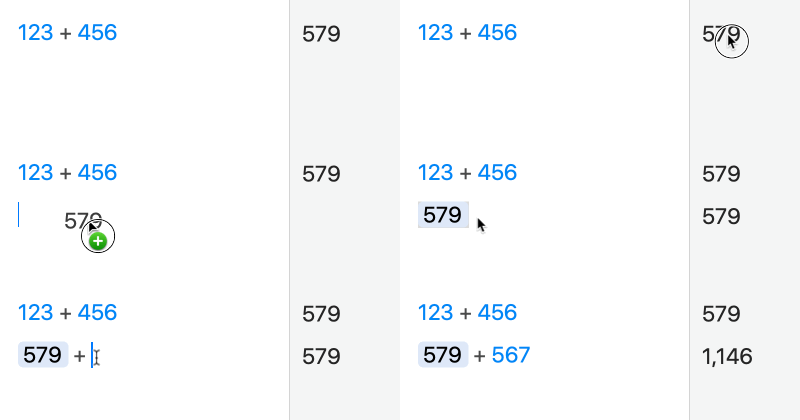
1\. 참조하려는 라인의 답변을 드래그합니다:
{% hint style="info" %}
답변을 더블 클릭하여 참조를 삽입할 수도 있습니다.
{% endhint %}
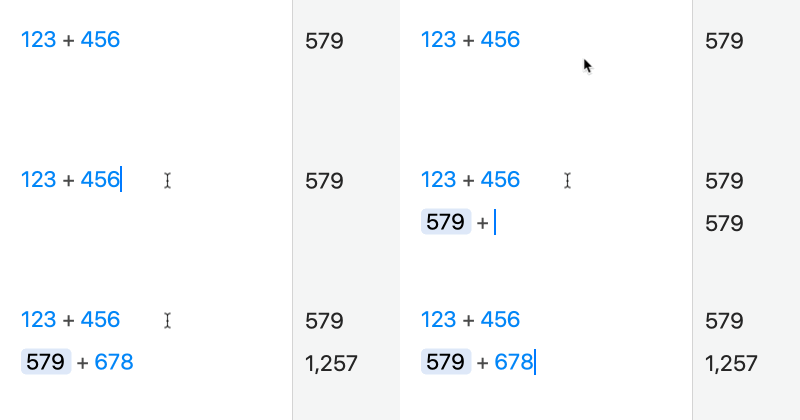
2\. 새 라인을 시작하려면 리턴을 입력한 직후 연산자(예: +)를 입력합니다:
키보드 단축키 ⌘\를 사용하여 이전 라인에 대한 참조를 삽입할 수도 있습니다.
{% hint style="warning" %}
참고: 현재 라인보다 **위쪽**에 있는 라인만 참조할 수 있습니다.
{% endhint %}
{% hint style="info" %}
참조를 비활성화하지만 수식을 현재 상태로 유지하려면, 참조를 마우스 오른쪽 버튼으로 클릭하고 'Unlink'를 선택할 수 있습니다.
{% endhint %}