> For the complete documentation index, see [llms.txt](https://documentation.soulver.app/llms.txt). Markdown versions of documentation pages are available by appending `.md` to page URLs; this page is available as [Markdown](https://documentation.soulver.app/ja/documentation/line-references.md).
# 行参照
以前の回答を使用した計算の実行(スプレッドシートのような)
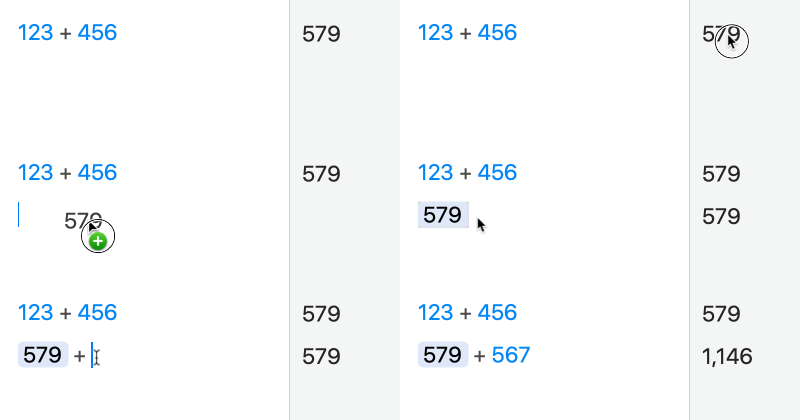
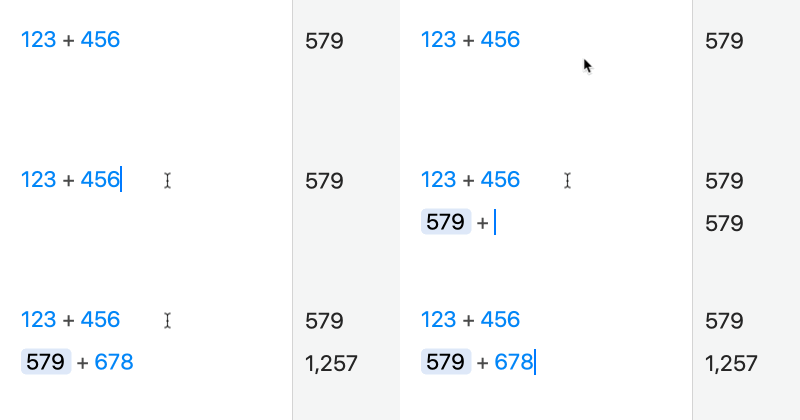
Soulverを使用すると、スプレッドシートのように、計算で以前の行の回答を参照できます。
過去の行を編集し直すと、それを参照しているすべての行が自動的に再計算されます。
#### 以前の行を参照する方法:
1. 参照したい行の回答をドラッグします。
{% hint style="info" %}
回答をダブルクリックするだけで、参照を挿入することもできます。
{% endhint %}
2. 改行して新しい行を開始した後、演算子(+など)を入力します。
キーボードショートカットの ⌘\ を使用して、前の行を参照することもできます。
{% hint style="warning" %}
注意:現在の行より**上の**行のみを参照できます。
{% endhint %}
{% hint style="info" %}
参照を無効にしたいが、式を現在の状態で保持したい場合は、参照を右クリックし、「リンク解除 (Unlink)」を選択できます。
{% endhint %}