---
description: Doing calculations using previous answers (like in a spreadsheet)
---
# Line References
Soulver lets you reference previous lines' answers in your calculations, like a spreadsheet.
You can go back and edit a previous line, and any lines that refer to will recalculate automatically.
#### To reference a previous line:
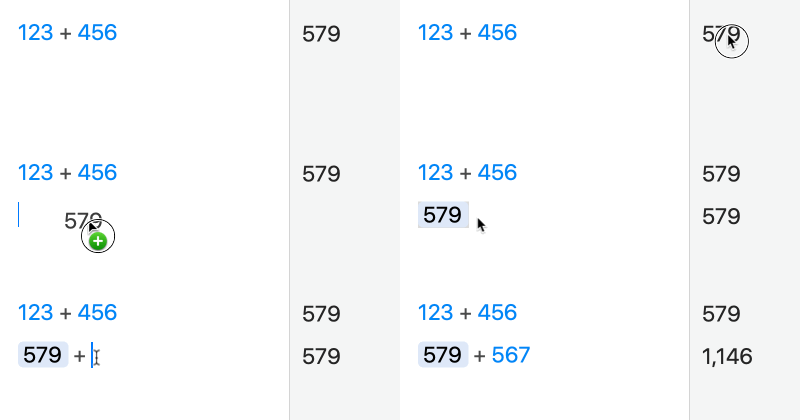
1\. Drag in the answer from the line you want to reference:
{% hint style="info" %}
You can also just double click the answer to insert a reference to it
{% endhint %}
2\. Type an operator (like +) immediately after typing return to start a new line:
You can also insert a reference to the previous line using the keystroke ⌘\\.
{% hint style="warning" %}
Note: you can only reference a line **above** your current line.
{% endhint %}
{% hint style="info" %}
If you want to disable a reference, but keep an expression in its current state, you can right-click on a reference and choose 'Unlink'.
{% endhint %}